
Backup revisited
Posted in thoughts
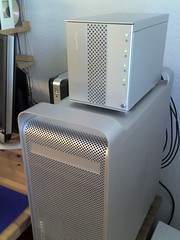
I've recently fine tuned my overall backup strategy and finally found a balance between efficiency, security and ease of use that suits me. As you may or may not know, I'm a paranoid sucker when it comes down to backup. I've sadly seen too many disks crash over the years to know that sh*t happens. The main issues I had were related to running automatic unattended backup, off site rotation of a full copy of the backup, and overall reliability.
My situation is not exceptional: I have a server in the office serving my files, svn repository and development websites to a Mac Pro in the office or a MacBook Pro out of the office.
The general idea is to have my project files and assets available at all times should I be in the office of not. The resources need to be available at all times as I don't always work in the office. A VPN connection secures me in when I'm out, and svn over ssh gets my files in and out securely.
The server uses two RAID 1 ifttt (mirrors), one for production and the other for backups. I use a Sonnet Fusion D400 to store my drives which connects through eSATA to a dedicated controller in the server. The production array hosts all my assets, projects, svn repository and files, while the backup array stores a mirror copy of the production array and of my different computers hard drives. The backup array is bigger (500Gb) that the production one (300Gb) as it must contain the backup of the server as well as those of my workstation and notepad.
Rotate off site
I use SoftRAID 3 to manage the ifttt. Not only do I find it reliable and easy to use, but it essentially enables me to have a 3 disk mirror array for backup. Two disks are online while the third is stored securely off site in a read-only mode (see the user manual for more details). The secondary disk is swapped every Monday morning and brought up to sync automatically.
The backups are performed by SuperDuper. I've given many other software a try, but SD comes out a winner (for me), even over Unix favourites such as rsync which unfortunately tends to be buggy on Mac OS X. Joe Kissel in his excellent book on Take Control of Mac OS X Backups says:
"Unfortunately, Apple's rsync is several years out of date, fails to copy several important pieces of metadata, and is reputed to be crash-prone. The developer of RsyncX created his own version of rsync, which gets rid of some problems of Apple's version but adds a few more. And there are at least one or two other versions of rsync that similarly offer different trade-offs of capabilities and problems."
Page 161
On the downside, in order to use SD's Scheduler, the account used to configure it must be logged in. Although I don't like the idea of my server being "open", direct physical access to it is limited, so it's a small price to pay. On the workstations the problem doesn't occur as they are shutdown after backup.
Another downside is that you need to turn the option "Copy ACLs" off otherwise a bug in Apple's ACL Copy code crashes SD. Dave Nanian of Shirt Pocket said their development team was working on replacing their calls with their own as Apple doesn't seem to want to fix it. All we need is a command-line interface and I'll will definitively be the best (for me).
Duplicate
The backups (read duplications, as I don't archive incremental or differential copies of files) are performed on a daily or weekly basis depending on their usage. The RAID is backed upevery evening and the server's startup disk (non RAID) every week. I launch the Mac Pro's smart backup when I leave the office, and trust SuperDuper to shut them down after completion. The MacBook Pro gets backed up either at the office or at home when I feel it needs to.
A sweet addition to this configuration is that in case of duplication failure, Growl notifies me by e-mail via the MailMe display style. If you wanted, you could have instant SMS notification by using an e-mail to SMS portal such as World-Text for instance.

This solution works for me at the time of writing, it might not for you, and I might have changed in a year from now. But I have redundancy for maximum availability and uptime and off site storage for disaster recovery with a minimum of manual intervention.